The Payroll menu allows you to perform multiple payroll related functions, including the Holiday Calculation, Seniority Calculation, Birthday Calculation, Time Bank Update, Discipline, Assign Hours etc.
|

Tool Bar Options

 Open saved settings
If you make any changes to previously defined saved settings, you may access them here.
 Save your settings.
If you make any changes to previously defined settings that you want to be permanent or save a new setting.
 New Report Settings
Click to clear screen of previously saved reports and create a new one.
 Process
When clicked will run the Seniority calculation chosen and present a preview (report) of the update on screen. The hours calculated will also write to the employee’s personnel profile screen.
 Preview Options
Allows you to choose from the following preview options:
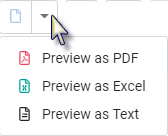
 View the report in PDF format
No processing will occur.
 Report Action
Allows you the option of emailing the report (configuration is required).
 Cancel Report
Allows you to cancel the running process. Will only be active once processing has begun.
 Filter options
Process only the selections made. Example one department, a group of employees or a class.
 Options
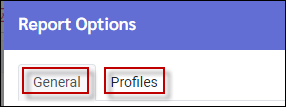
The following two tabs will appear allowing you to delete reports, set email options, show report in minutes or use AM PM format etc.