To configure the general rules navigate to the Company Profile / General.
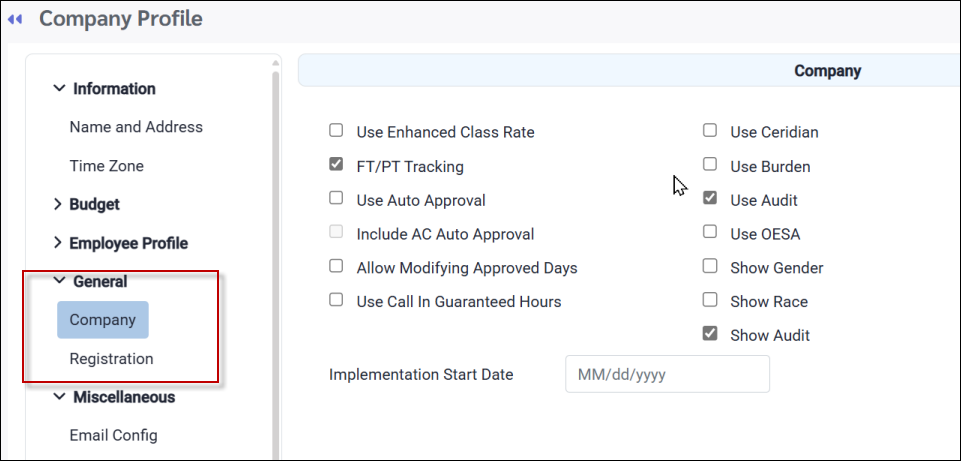
Company
Used Enhanced Class Rate
This field should always be enabled to allow you to display different class rates, based on seniority, on the Employee Class menu.
FT/PT Tracking
This option enables the full-time and part-time (type) tracking grid at the bottom of the Employee Class menu.
Use Auto Approval
If enabled, this option will automatically approve a Time Card with hours on the process date when the Poll & Process runs. Time cards with exceptions will be skipped.
Include AC Auto Approval
Tick this option to include Attendance Code hours in the Time Card auto approval process described above. If ticked, this option will auto approve Attendance Codes, whether or not the system has worked hours.
Allow Modifying Approved Days
This option lets you modify approved days without first having to reverse the approval.
Use Call In Guaranteed Hours
This option enables the the Call in Guaranteed Hours feature.
Use Ceridian
This option enables the custom Ceridian field in the payroll section of Personnel.
Use Audit
This option when ticked, enables the tracking of data changes. This field should always be activated.
Use OESA
This option enables the custom Ontario Employment Standard Act vacation configuration.
Show Gender
This option enables the Gender field in Personnel.
Show Race
This option enables the Race field in Personnel.
Show Audit
This option displays the audit tracking on the Time Card.
Registration
This option displays the features and menus available based on the user's license.